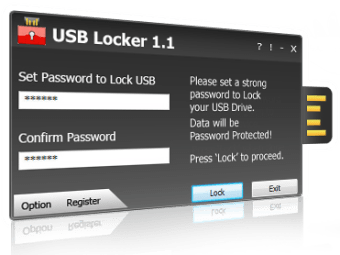
USB Locker is a Windows application that helps protect all your USB drives through a password. You need not install the app on a particular target device. Thanks to the portability status, you may use portable media devices to store the app and take the application with you. There are no entries written in the Windows registry. Therefore, getting rid of the app is as simple as deleting it. Also, no administrative privileges are needed to open the app. As far as passwords go, only some configuration settings are concealed so that you can easily change password and mitigate brute force attempts by closing the program automatically post three wrong password attempts.
Simple and Secure
Upon opening the application, you get to see a minimalist layout embedding only certain configuration settings. There is no help manual included as the program’s features can be decoded easily, thanks to the highly intuitive interface.
With USB Locker a User canLock USB Drives & all Portable Drives
USB Locker is a strong portable drive protection application for all kind of USB drives including flash drives, thumb drives, memory cards and external drives. USB Locker offers you unparalleled protection across multiple platforms including Mac, Windows and Linux. Some high lighted features are:Matchless Portable device protection.Single Click Protection.Cross Platform Protection.Protection against Data leak.Secure all portable drivesConvenient to Use.Data Recovery with Master Key.Hack Attempt Security.
Keeping at a complete mind rest, USB Locker gives your data a robust protection against unauthorized access and keeps your data safe from misuse. Security at its best!USB Locker provides end-user with an extremely fast and strong protection for the security of your portable drives without installing the application on your computer.USB Locker is extremely fast, feather-light and PC independent, making it one of the most robust portable drive protection available.
USB Locker is so small in size which is just 115 kb. And its directly executable. Just download it and copy it to any portable drives, it will ask you to set password and its On. Thats it. It will start securing your USB or any other portable drives. Its password is unbreakable.
USB Locker is a strong portable drive protection application for all kind of USB drives including flash drives, thumb drives, memory cards and external drives.
Very bad software. I would not recommend it to anyone. Locks drives without the option to access data or unlock drive.
Anonymous user
Very bad... lost all my data... don't use this software!
Anonymous user
MY FILES ARE LOST. Pen drive is locked bt when i am unlocking it i cant able to see my files. Cons: MY FILES ARE LOST
Anonymous user
The worst software. the worst software i have ever seen, after installing this i lost all my data... so total waste. Please don't ever try this..
Anonymous user
Very disappointed.. This program doesn't work, it lock my USB with out option to unlock it. I won't recommend this for my friend.
Anonymous user
I won't recommend this program. This program lock my 32GB device with out unlock condition so I can't use my device at all til now. My firefox is also damaged after the installation. After it has been installed, register tab and options tab doesn't work. It seem I lost my whole data in this device:(
Laws concerning the use of this software vary from country to country. We do not encourage or condone the use of this program if it is in violation of these laws. Softonic may receive a referral fee if you click or buy any of the products featured here.